Fine-Tuning One Motion MagDrives with Allen-Bradley Drives: What You Need to Know
Tuning One Motion MagDrives with an Allen-Bradley PowerFlex 525 isn’t just about setup—it’s about protecting performance.
What to understand…
The right drive parameters ensure smooth operation, optimized current draw, and long-term reliability in washdown food-processing environments.
Below are the most important considerations for technicians and engineers when commissioning or maintaining One Motion MagDrives with PowerFlex 525 drives
Read this guide for relative best practices. OM-Tuning-Guide-PowerFlex525.
But for now, read more below.
1. Start with Accurate Product Data
Each One Motion MagDrive model has its own rated voltage, current, and torque ratings. These values must be pulled from the One Motion product data sheet before entering them into the PowerFlex 525.
Using the wrong data can lead to overheating, inconsistent torque output, or voided warranty.
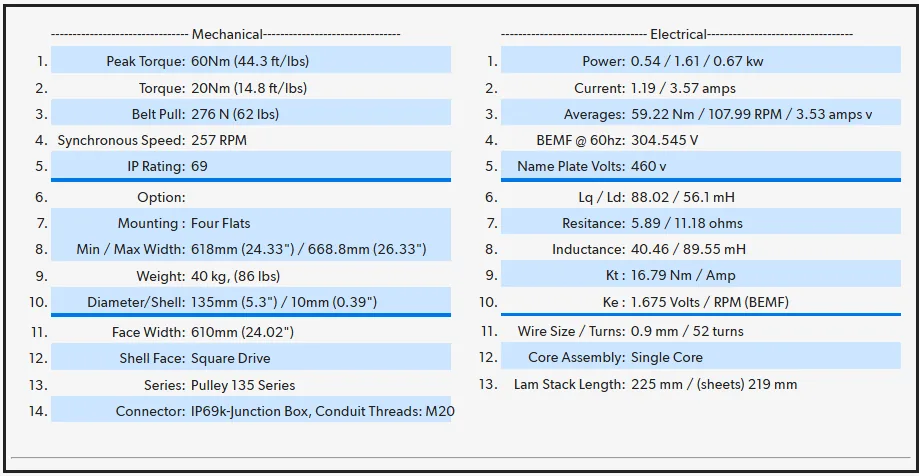
For example, a typical MagDrive like the OD69-60-135-610-11193 operates at:
- Continuous Current: 1.19 A
- Maximum Current: 3.57 A
- Rated Speed: 257 RPM
Always confirm these numbers for your specific part number before tuning.
If you don’t know your part’s technical details, just ask Technical Support
2. Understand Current Limits
Current defines how hard your MagDrive is working. Exceeding rated current shortens its life, especially in washdown environments where friction and resistance can fluctuate.
- Continuous Current is the safe level for normal operation. Aim to keep the drive reading (parameter B003) between 1.0 A and 1.1 A.
- Maximum Current is acceptable only for brief surges—no more than 20% of the duty cycle (e.g., ≤120 s in 10 min).
Monitoring current regularly ensures your MagDrive stays cool and efficientOM-Tuning-Guide-PowerFlex525.
3. Apply the Right Drive Protections
The PowerFlex 525 allows you to set both warning and fault thresholds for overcurrent protection. These parameters safeguard the MagDrive from damage during startups, jams, or product surges:
Recommended settings to review. (Part Specific)
Purpose Fault Limit A484 = 4.00 A Stops drive under extreme overload
Warning Level A486 = 2.38 A Early alert to rising load
Trip Limit A488 = 3.57 A Hard stop if sustained overload
Time Delay A489 = 5s Allows short bursts before fault
These values balance responsiveness with protection, preventing nuisance trips while preserving MagDrive healthOM-Tuning-Guide-PowerFlex525.
4. Control Acceleration and Deceleration
High inrush current during startup or abrupt stops can cause unnecessary stress on the MagDrive. Setting smooth acceleration and deceleration times protects both the drive and mechanical components.
- P041 (Accel Time): 10 sec
- P042 (Decel Time): 10 sec
This “soft-start” approach helps stabilize current draw, especially after washdowns when surfaces are slick or when trays and product loads varyOM-Tuning-Guide-PowerFlex525.
5. Monitor Current Live (B003 Parameter)
The PowerFlex 525’s B003 parameter displays real-time current output. Monitoring this during operation helps catch friction buildup, product jams, or alignment issues before they trigger faults.
For example:
- 1.0–1.1 A → Optimal running range
- >1.19 A → Indicates potential friction or buildup
- >2.38 A → Approaching fault threshold
Routine monitoring should be part of every preventive-maintenance plan
6. Tune for Real-World Conditions
Washdown food-processing lines see changing loads—wet trays, meat surges, and product buildup can alter current behavior. Use PowerFlex tuning parameters to maintain stable torque and speed:
- A533 (Break Frequency): Increase +1 Hz to improve grip or prevent slipping.
- A581 (PM Stable 1 Frequency): Increase +2 to smooth speed fluctuations.
- A531 (Start Boost): 6% to improve torque under load.
These fine adjustments ensure smooth conveying even under variable real-world conditions
7. Keep Safety and Longevity in Focus
Proper tuning is more than achieving speed—it’s about keeping the MagDrive within safe limits that extend its life. By balancing acceleration, load management, and current control, you maximize reliability and protect your investment.
The result: a system that runs cooler, lasts longer, and stays compliant with One Motion’s 3-year warranty standards.
Need Help with Setup?
For specific part-number data or setup verification, visit the One Motion Technical Support Portal: onemotion.tech/technical-contact.html
Smarter setup. Stronger performance. Cleaner production. That’s the One Motion way.
Found this useful? Share it with your team.