
Overview
One Motion drives are designed for tough washdown sanitary environments (IP69K), like food plants handling meat, cheese or baked goods. They’re built for reliability, need no maintenance under normal conditions and come with a 3-year warranty.
This guide helps your maintenance team manage current levels during setup and troubleshooting, to keep your drives running efficiently.
The example drive
This is a relative guide based on example part OD69-60-135-610-11193. Every One Motion part has its own technical data. Contact technical support for your part number’s data.
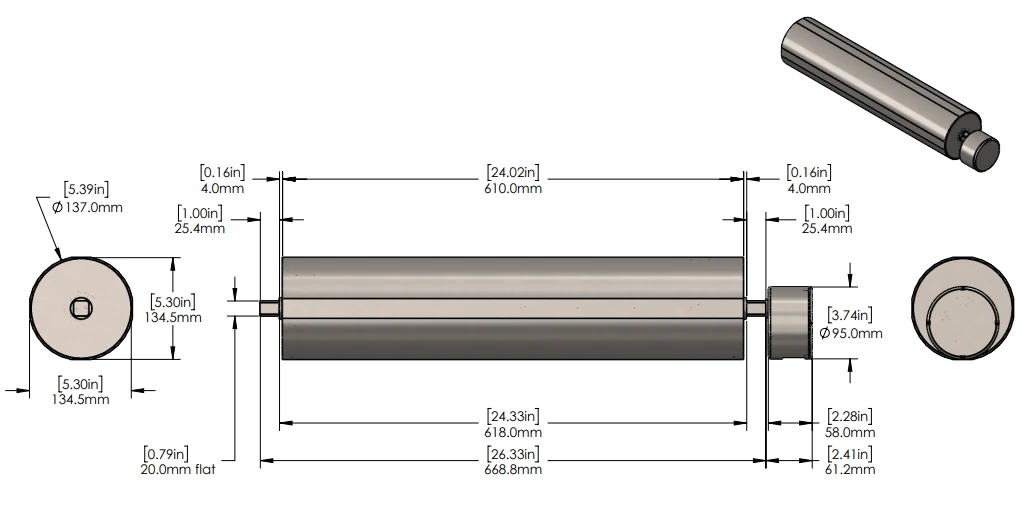
These are the example drive’s ratings, from its One Motion product data sheet:
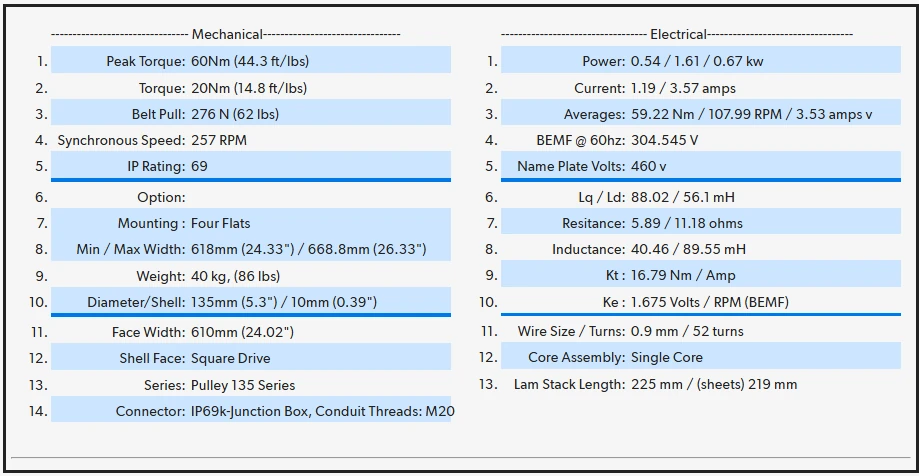
Example current values
- Continuous current: 1.19 A
- Maximum current: 3.57 A
Important: continuous and maximum current values are specific to each product. Always check your drive’s product data sheet for its exact ratings before setup or troubleshooting.
What current limits mean
Current limits tell you how much electrical current your drive can handle safely. Going over them can overheat the drive and cause damage or early failure.
Continuous current
This is the normal operating current for steady, continuous use. For the example drive it’s 1.19 A (check your data sheet for your drive’s value).
Stay safe: run the drive at or below 1.0–1.1 A to keep it cool and extend its life.
Maximum current
This is the highest current the drive can handle in short bursts, like startup or a sudden heavy load. For the example drive it’s 3.57 A (again, check your data sheet).
Limit the time: don’t let the drive run near maximum current for more than 20% of its duty cycle. For a 10-minute cycle (600 seconds), that’s 120 seconds at most. For a 5-minute cycle (300 seconds), it’s 60 seconds.
Best practices in washdown
In a washdown environment, drives face wet conditions, high-pressure cleaning and load spikes from slippery surfaces or product surges. Follow these best practices, using the PowerFlex 525 as the example:
| Best practice | Target | Why it matters |
|---|---|---|
| Keep continuous current below 1/3 of maximum | ≤ 1.19 A (check your data sheet) | Stops the drive overheating during long runs |
| Run in the safe range | 1.0–1.1 A | Gives a safety buffer to prevent damage |
| Limit time at maximum current | ≤ 20% of duty cycle (e.g. 120 sec in 10 min) | Prevents heat build-up and stress during startups or surges |
| Check current often | Use the drive’s B003 parameter | Lets you spot problems early and adjust |
Setting up the PowerFlex 525
The Allen-Bradley PowerFlex 525 controls and protects your drive. Use Connected Components Workbench (CCW) to set it up with these settings, which suit a washdown environment.
Step 1: Enter the drive data
Use the values from your One Motion product data sheet to set these parameters:
| Parameter | Setting | What it does |
|---|---|---|
| P033 | 60 Hz | Sets the drive’s frequency |
| P034 | 1.19 A (use your data sheet value) | Sets the continuous current |
| P036 | 257 RPM | Sets the drive’s speed |
| P484/P485 | 3.22 A | Sets a safe overcurrent limit |
Step 2: Set up safety protections
These settings stop the drive running too hot or overloading:
| Parameter | Setting | What it does |
|---|---|---|
| A484 | 4.00 A | Sets the drive fault limit (absolute limit) |
| A486 | 2.38 A (1.19 × 2.0) | First overcurrent warning level |
| A487 | 10 sec | Waits 10 sec before stopping on overcurrent |
| A488 | 3.57 A (use your maximum current) | Final overcurrent limit |
| A489 | 5 sec | Stops if maximum current lasts over 5 sec |
Step 3: Adjust start and stop
These settings avoid big current spikes when starting or stopping:
| Parameter | Setting | What it does |
|---|---|---|
| P041 | 10 sec | Time to reach target speed (application specific) |
| P042 | 10 sec | Time to slow to 0 Hz (application specific) |
Troubleshooting in washdown
How to handle common situations, like restarting after cleaning or a heavy load, with the settings above.
Scenario A: normal operation (cheese block conveyor)
Situation: a conveyor moving 2 kg cheese blocks for packaging, running 8 hours a day. Goal: keep current at 1.0–1.1 A.
- Check B003 on the drive for live current (it should read 1.0–1.1 A).
- If current goes over 1.19 A (for example from cheese residue building up), clean the conveyor to reduce friction.
- The drive stops if current stays above 2.38 A for 10 seconds (the A486/A487 settings).
Scenario B: restart after washdown (wet trays)
Situation: the conveyor restarts after a high-pressure washdown, moving wet trays of chicken. Goal: avoid maximum current (3.57 A) for more than 60 seconds in a 5-minute cycle.
- A soft start (P041 at 10 seconds) keeps startup current around 2.5 A.
- If current hits 3.57 A (for example, trays sticking from suction), the drive stops after 5 seconds (the A489 setting).
- After startup, make sure current settles to 1.0–1.1 A. Dry the trays if needed to reduce sticking.
Scenario C: heavy load surge (meat packages)
Situation: a sudden surge of heavy 3 kg meat packages on the conveyor. Goal: keep maximum current (3.57 A) under 120 seconds in a 10-minute cycle.
- The drive stops if current hits 3.57 A for over 5 seconds (the A489 setting).
- If the conveyor slips, increase A533 (we suggest 1 Hz at a time) to improve grip.
- If speed stutters, increase A581 (we suggest +2) to smooth it out.
- Spread the packages out to bring current back to 1.0–1.1 A.
Quick reference
| Operation | Safe limit | Drive settings to check |
|---|---|---|
| Normal running | 1.0–1.1 A (max 1.19 A) | B003, A484 |
| Startup or surge | ≤ 3.57 A for ≤ 20% of the cycle | A488/A489, P041 |
| Safety protections | Stop if over limits | A486/A487, A488/A489 |
Get your part’s technical data
Contact technical support for your part number’s technical data, or look it up by serial number in Find my drive (opens in a new tab).
PowerFlex 525 parameter reference
A complete breakdown of the parameters used to configure, monitor and protect One Motion permanent magnet drives on the PowerFlex 525. Parameter names are Allen-Bradley’s.
Basic setup (P parameters)
| Parameter | Name | Recommended value | Description |
|---|---|---|---|
| P031 | Motor NP Volts | As per tech sheet | Nominal voltage rating |
| P032 | Motor NP Hertz | 60 Hz | Rated operating frequency |
| P033 | OL Current | 1.19 A | Sets the overload threshold slightly below maximum current |
| P034 | Motor NP FLA | 1.19 A | The drive’s continuous rated current |
| P035 | Motor NP Poles | 28 | Number of poles (based on RPM) |
| P036 | Motor NP RPM | 257 RPM | Rated speed at 55 Hz |
| P037 | Motor NP Power | 1.61 kW | Output power (HP or kW) |
| P039 | Torque Performance Mode | 4 | Enables PM control |
| P041 | Accel Time | 10 sec | Ramp-up time to limit inrush current |
| P042 | Decel Time | 10 sec | Controlled stop to prevent overvoltage |
| P484 | OL Current Level 1 | 3.57 A | Trip level to detect sustained overloads |
| P485 | OL Time Level 1 | 3.57 A | Trip level to detect sustained overloads (matches P484) |
Advanced protection and current limiting (A parameters)
| Parameter | Name | Recommended value | Description |
|---|---|---|---|
| A484 | Current Limit One | 4.00 A | Sets a non-fault current cap for continuous operation |
| A486 | Shear Pin 1 Level | 2.38 A | First overcurrent fault threshold |
| A487 | Shear Pin 1 Time | 10 sec | Time allowed at A486 before a fault |
| A488 | Shear Pin 2 Level | 3.57 A | Maximum current (absolute fault limit) |
| A489 | Shear Pin 2 Time | 5 sec | Time allowed at A488 before a trip |
| A516 | PM Initial Selection | 1 (HFI) | Prevents rollback at startup |
| A517 | PM DC Injection Current | 100% | Ensures proper alignment at startup |
| A518 | PM Align Time | 0 sec | Disables the alignment delay for a faster start |
| A527 | PM FWKn 1Kp | 500% | Improves field-weakening performance |
| A528 | PM FWKn 2Kp | 500% | Improves high-speed stability |
| A531 | Start Boost | 6.0% | Improves startup torque |
| A532 | Break Voltage | 55.0% | Improves starting under load, or fixes overloads |
| A533 | Break Frequency | +1 Hz as needed | Prevents slipping under shock loads |
| A581 | PM Stable 1 Frequency | +2 | Reduces speed ripple or torque instability |
| A585 | PM Motor Type | 1 (Surface Mount) | Selects the correct PM profile |
| A586 | PM Stepload Kp | 10% | Improves step-load performance |
| A587/A588 | PM Efficiency 1/2 | 1900% | Stabilizes current and reduces oscillation |
Live monitoring (B parameters)
| Parameter | Name | Recommended value | Description |
|---|---|---|---|
| B003 | Output Current | Live value | Real-time draw, for diagnostics |